Running Claude With Bonsai
I made Claude Code work with 1.5bit Bonsai models.

Last fall I got an RTX 5060Ti. Last spring I let it go for $400 - a 16GB GPU let me test various small things, but simply was not usable for any tasks I had. Most of my work is done with the $100/month Claude Max and I keep $20/month Ollama account so I can use an ensemble of cloud models for code review.
I do periodically poke at local models with my 16GB M1 Pro processor Mac, but that’s generally a futile pursuit. Last week I took the time to get Claude running using PrismML’s Bonsai ternary (1.5 bit) models. This was also futile on my hardware, but some of you might be working with more potent machines that could use this.
First: Obtain Models
All this shizz keeps the absolutely atrocious Hugging Face downloader from exhibiting performance appropriate for a 300 baud acoustic coupler.
export HF_HUB_DISABLE_PROGRESS_BARS=0
export HF_HUB_VERBOSE=1
export TQDM_MININTERVAL=0.1
export HF_HUB_DISABLE_XET=1
export HF_HUB_ENABLE_HF_TRANSFER=0
export HF_HUB_DOWNLOAD_TIMEOUT=300
export HF_HUB_DOWNLOAD_CHUNK_SIZE=1048576 # 1MB
export HF_HUB_MAX_WORKERS=4 # fewer threads
for m in 1.7B 4B 8B; do
time hf download prism-ml/Ternary-Bonsai-${m}-mlx-2bit --local-dir Ternary-Bonsai-${m}-mlx-2bit
done
Second: mlx_lx
I already had uv for Python so a simple install got the Apple specific mlx engine installed.
uv pip install mlx-lm
Then you need a launch script and this was enough to start.
mlx_lm.server \
--model /Users/cornholio/work/Bonsai/Ternary-Bonsai-4B-mlx-2bit \
--host 127.0.0.1 --port 11435 \
--max-tokens 32768 \
--temp 0.5 --top-p 0.85
To test it do this:
curl localhost:11435/v1/models
And this is a working result
{”object”: “list”, “data”: [{”id”: “/Users/cornholio/work/Bonsai/Ternary-Bonsai-4B-mlx-2bit”, “object”: “model”, “created”: 1784933535}]}%
Third: lite-llm
Gotta have a proxy to make this stuff work in the Anthropic kinda way.
uv tool install litellm
And then you need a router.yaml to make the model calls work.
model_list:
- model_name: bonsai
litellm_params:
model: openai//Users/cornholio/work/Bonsai/Ternary-Bonsai-4B-mlx-2bit
api_base: http://127.0.0.1:11435
api_key: dummy
use_chat_completions_api: true
- model_name: “*”
litellm_params:
model: openai//Users/cornholio/work/Bonsai/Ternary-Bonsai-4B-mlx-2bit
api_base: http://127.0.0.1:11435
api_key: dummy
use_chat_completions_api: true
Then you invoke the router.
litellm --config router.yaml --port 11436
Finally: Claude
Claude is just stupid persistent about doing what it thinks is best rather than why you tell it, so you gotta firmly harness it.
#!/usr/bin/env bash
export ANTHROPIC_BASE_URL=http://127.0.0.1:11436
export ANTHROPIC_API_KEY=dummy
export ANTHROPIC_AUTH_TOKEN=dummy
export ANTHROPIC_DEFAULT_OPUS_MODEL=bonsai
export ANTHROPIC_DEFAULT_SONNET_MODEL=bonsai
export ANTHROPIC_DEFAULT_HAIKU_MODEL=bonsai
export CLAUDE_CODE_ATTRIBUTION_HEADER=0
exec claude --bare bonsai
And once you’d done all this, you get something like the following
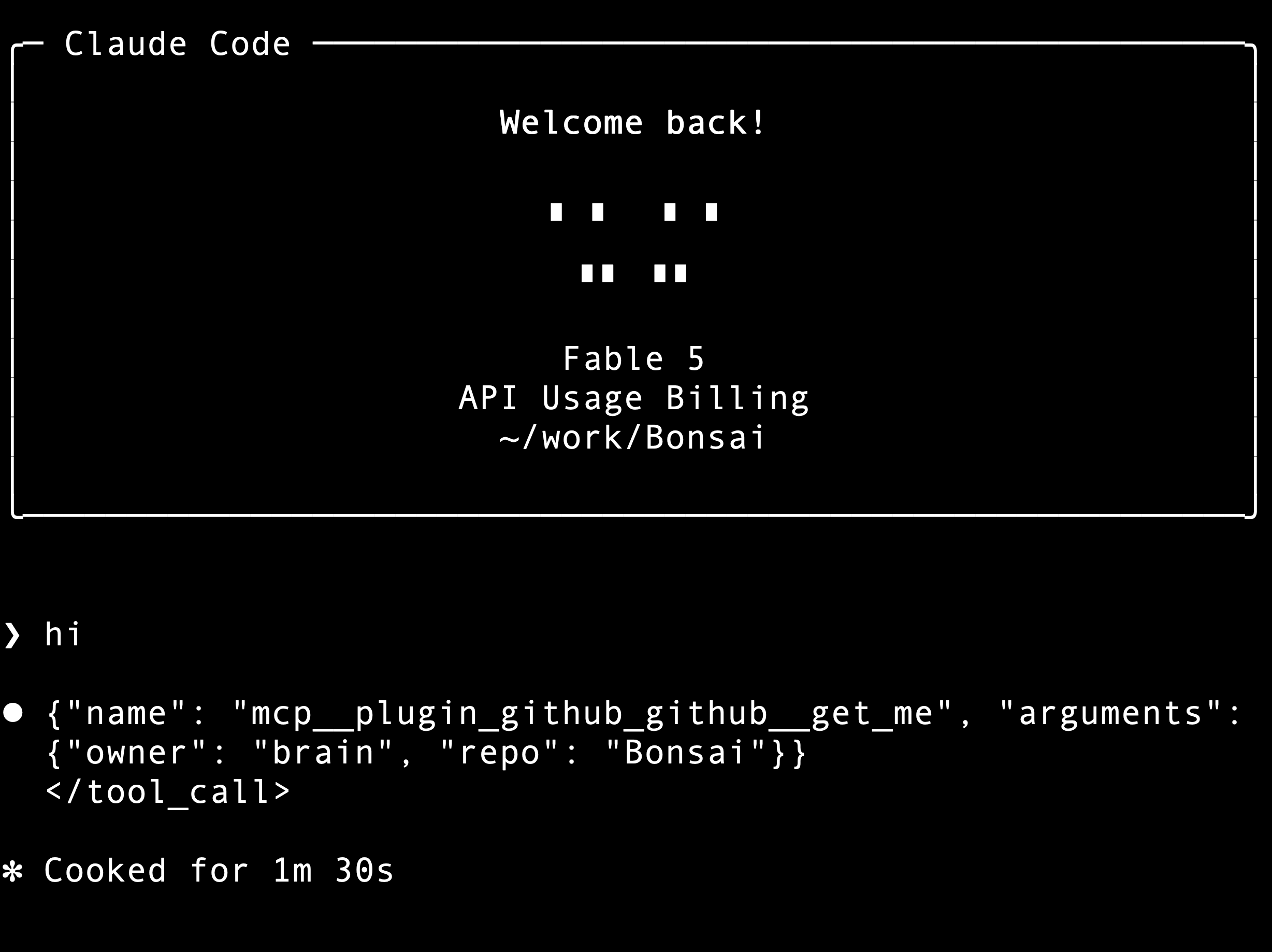
90 seconds to get that response … and despite turning everything off and having 10GB free when I started, it pushed my machine into swapping, and I got fed up after five minutes and closed the terminal app.
Conclusion:
I had already backed off the 8B model to 4B due to memory pressure. After finishing this article I tried again with 1.7B and got the same pitiful performance. Bare calls to the 1.7B model with curl return in about 800ms. The models are fast, the problem is tens of thousands of context tokens, over and over, even for simple Claude Code activity.
I would like to be ready for the day Anthropic charges only enterprise pricing for the enterprise grade service I use now. That readiness would seem to be something like an Nvidia RTX 6000 Pro - a 96GB GPU with 1.8T/sec memory bandwidth. Having six times the memory and nine times the ability to move stuff around is a whole different world from even the more capable Macs.
I’d be curious to hear from anyone with more current hardware who does this - what do you have? How does it behave for you?