
Claude Code With Your GPU
Fahd Mirza explains.

I have previously tried to do this a couple of different ways - using my local GPU for one of the CLI programming tools. Upgrading to Claude Max at $100/month has been an excellent solution, but I am still curious, so when I saw this Fahd Mirza video …
Here’s what I did to get it running:
Step 1 add some environment variables, log out, log back in to make them live.
export ANTHROPIC_AUTH_TOKEN=ollama
export ANTHROPIC_BASE_URL=http://localhost:11434
Step 2 get a Qwen Coder that will fit your GPU - in my case this 7B makes sense.

Step 3 this is ollama.service, use 4-bit KV cache to save ~50-70% VRAM, don’t forget to restart the ollama service after making the change.
[Unit]
Description=Ollama Service
After=network-online.target
[Service]
ExecStart=/usr/local/bin/ollama serve
User=ollama
Group=ollama
Restart=always
RestartSec=3
Environment=”PATH=/root/.local/bin:/usr/local/sbin:/usr/local/bin:/usr$
Environment=”OLLAMA_KV_CACHE_TYPE=q4_0”
[Install]
WantedBy=default.target
Step 4 make a Modelfile
FROM qwen2.5-coder:7b
# Set the context window to 128k
PARAMETER num_ctx 131072
Step 5 make a new Ollama model with the expanded context
ollama create qwen7b-128k -f Modelfile
Step 6 load the model
ollama run qwen7b-128k:latest
Step 7 run Claude with the model
claude --model qwen7b-128k:latest
Results:
The model is smart enough to write Hello, world!
But not swift enough to actually save it in hello.py - I tried half a dozen different ways to coax it to do this.
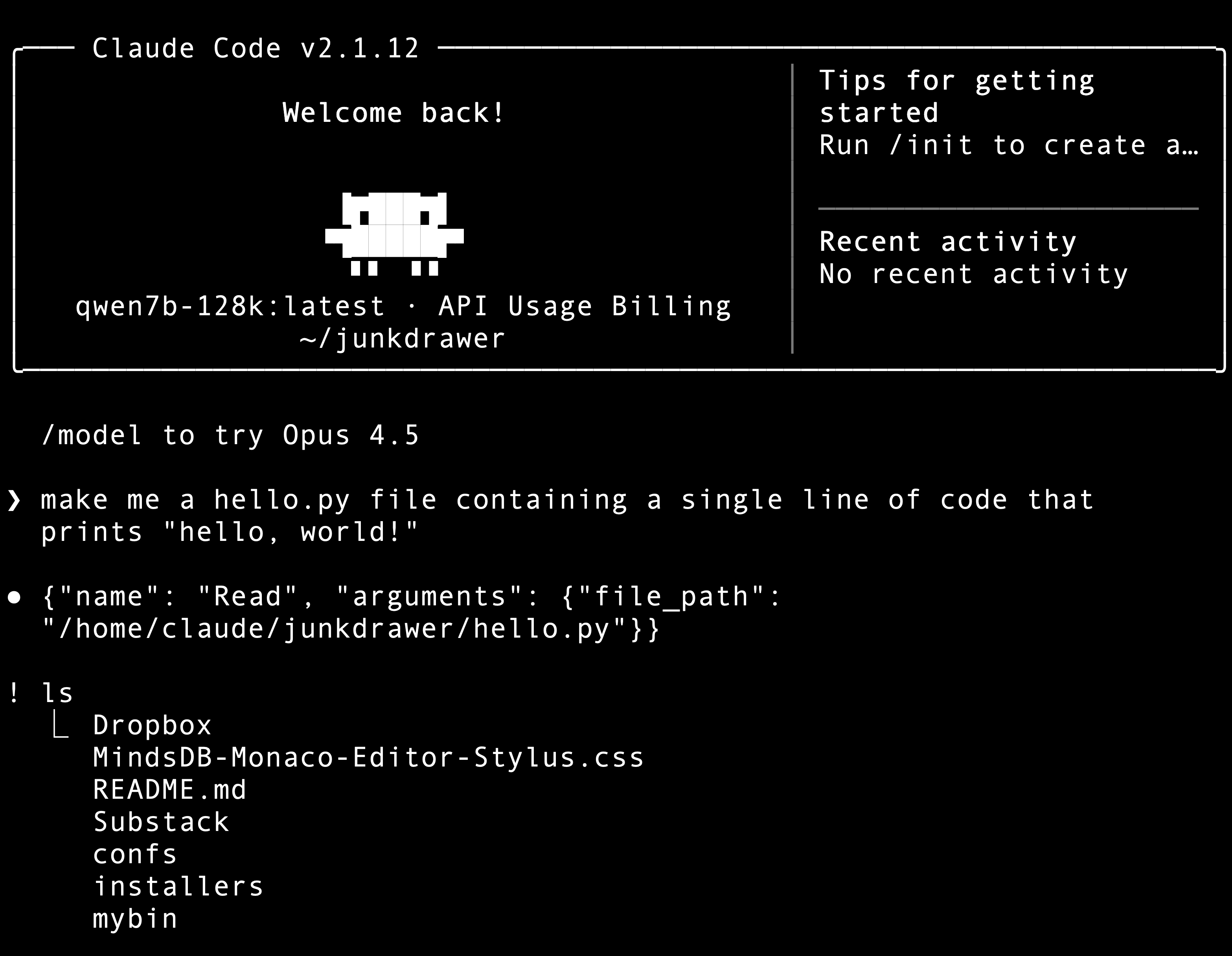
This might have more to do with my lack of knowledge with this particular harness rather than the limited 7B model. Fahd is working with 4x the VRAM I have, a lot of the time I see him doing something interesting, then I check and not even a 32GB RTX 5090 will do the job, to say nothing of my little 16GB GPU. I’m just pleased I got this to run at all.
Conclusion:
Ollama is a petting zoo, lots of stuff in there that’s interesting to look at, but it’s not production ready. I have Ollama on my Mac and I installed it in the vLLM virtual machine just to get a look at this setup. The next step will be getting one of the Anthropic proxies to run with vLLM, so I have both APIs available and I don’t have to muck around with changing daemons like this.
And now I will get back to the work needed to get the startup funded, so I’m no longer the GPU equivalent of a full grown male Maine Coon trying to sit in a cigar box.